














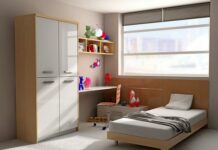









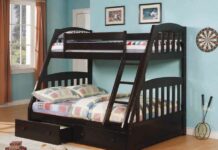





Working from home is rarely the tranquil picture we see in movies. More often, it involves dodging kids to find a quiet corner or staring at a laptop balanced precariously on a kitchen table. If you’ve had enough of the chaos, moving your workspace into a spare bedroom is a smart move. You get walls you can close off. You get silence. Maybe you can even finish a phone call without the dog barking in the background.
There is a financial perk, too. A dedicated home office can qualify as a tax deduction. Knowing you have a specific place to clock in helps build a routine. But giving up a guest room hurts. So, how do you make that room work for both sleep and business? It starts with ruthless planning.
Зміст
Clear the Decks and Map the Space
The best way to plan a home office design is to strip the room down. Empty it. Start with blank walls.
Take rough measurements. Draw a sketch. Note where the electrical outlets sit. Mark the door swing. Locate the furnace vents. If you have interior design software, use it. Visualizing the layout virtually saves you from moving heavy furniture back and forth like a madman. You are looking for efficiency. You want to know where the desk goes before you lift a box.
Small bedrooms demand creative solutions. Standard furniture often eats up too much floor space. You need to look up. Install vertical shelving in the closet. Use wall-mounted units for books and lightweight gear. Don’t let corners go to waste.
Corner Desks and Vertical Storage
A corner desk unit is a game-changer for small spaces. It utilizes that awkward triangular area that standard desks ignore. If you need a long surface for spreading out blueprints or sorting mail, a corner layout might offer the footprint you need. It can even double as a secondary station for a spouse who only uses the room for taxes a few times a year.
Storage is where organization dies or thrives. Lateral file cabinets are superior to deep drawers. They slide open sideways, saving the space in front of them. Add a desk with a hutch. That gives you vertical storage for supplies without taking up precious desk real estate.
In the closet, install wire shelving. It allows air circulation and makes it easy to see what you have. Keep office supplies there, not scattered across the nightstand.
Ergonomics and Lighting
Functionality means nothing if your back hurts. Ditch the dining chair. You need an office chair with lumbar support. It must adjust so your feet rest flat on the floor. Your neck needs support, too. This isn’t a luxury. It is a necessity for anyone spending eight hours a day staring at a screen.
Lighting is the other half of comfort. Standard overhead lights cast shadows. You need task lighting. Install desk lamps, table lights, or track lighting. You should be able to read a file label without squinting. You should see the instructions in your manual clearly. Strain leads to headaches. Headlines ruin productivity.
Workflow and File Management
Think about how you actually work. Do you handle customer files for weeks at a time? If so, keep those current documents within arm’s reach. Use rolling carts or desktop organizers.
For long-term storage, rely on standard cabinets. The trick is rotation. Move active files to an easy-access spot. Shuffle inactive ones to the deep storage. This prevents “file bloat” on your desk. A cluttered desk is a cluttered mind.
A dedicated office space can be a tax write-off, and knowing it’s there waiting for you provides a little extra incentive to develop a consistent work routine.
The average office worker uses about 10,000 sheets of paper a year. That is a lot of physical space to manage.
Transforming a bedroom into an office isn’t just about buying a desk. It is about creating a system. You need to balance the need for a bed with the need for a workstation. The next step is dealing with the specific hardware and wiring that makes the office functional. We will look at the technical details on the next page.
Did You Know?
The typical office worker uses around 10,000 sheets of copy paper every year.
Setting boundaries to protect your sanity
If your home office doubles as a game room or gym, you’re asking for trouble. The space suffers from conflict. You shouldn’t have to pitch pizza plates off your desk before you can open your laptop. Push for a dedicated office space. Keep items on hand to convert the space into an occasional guest bedroom if you must. Just stop there. If you want a temporary guest room, outfit it with a Murphy bed, daybed or futon. A daybed or futon will give you extra seating for office visitors, too.
Respecting the electronics
Your computer, printers and scanners are important resources. Take good care of them. Keep them out of direct sunlight. Away from drafts. Heat sources are also bad. Lift them up off the floor. Make sure there’s good air flow around your equipment. Oh, and avoid munching or drinking liquids when you’re using your computer. Accidentally spilling a latte in your computer is a mistake you’ll only make once before you institute a no food or beverage rule.
Protecting the carpet
A rolling office chair can get you from the file cabinet to your desk in a second. If your home office is carpeted, that trip will reduce the life of your carpet. It could turn out to be a bumpy ride. Install a chair pad for smoother sailing and carpet protection.
Keeping it green
If you’re working from home, you’re probably already saving gasoline. Reducing your carbon footprint is a bonus. Keep up the good work by turning off electronic equipment when you aren’t using it. Connect ancillary equipment to a power strip you can switch off. This eliminates any standby power drain. When you buy new equipment, look for the Energy Star label. If you do a lot of printing, use recycled copy paper. Reuse the back of printed sheets. Take advantage of your printer’s duplexing function.
Designing an attractive backdrop
If you anticipate any video conferencing in your future, consider the space the viewer will see from your webcam. Is it a wall full of sticky notes and electrical cords? Make it more visually appealing to your virtual visitors with a nice print, poster or wall shelf.
Soundproofing on a budget
How do you ensure good acoustics in a bedroom-turned-office? Incorporate soft furnishings like rugs and curtains. They absorb sound. This reduces echo. It improves call quality and concentration in your home office. What are cost-effective ways to soundproof a home office? Use door draft stoppers. Weather stripping around doors and windows minimizes outside noise. You can do this without significant renovations or expense.
The “Do Not Disturb” sign
Now that you have a dedicated work space, don’t be afraid to hang a “Do Not Disturb” sign on the door. That little warning dangling from the knob may turn out to be the best home office investment you make this year.